
The ability to handle files effectively is a crucial skill for anyone involved in programming, especially when dealing with data processing and storage. Python, known for its versatility and simplicity, offers robust facilities for file handling. In this comprehensive guide, we explore “how to open a file in python”, create, and write files using Python’s built-in functions and libraries. Whether you are an experienced developer or a beginner, understanding file operations in Python will enhance your capability to manipulate and manage data efficiently.
Understanding Python File Handling
Before delving into the specifics, it’s essential to understand the core concept of file handling in Python. Python provides built-in functions to perform various file operations such as opening, reading, writing, and closing files. The file handling system in Python is intuitive and tightly integrated with the language’s overall structure, making it relatively simple to manage files. Throughout this section, you’ll gain an overview of the concepts surrounding Python’s file handling capabilities.
Why File Handling Matters
File handling allows developers to store, manipulate, and retrieve information from a persistent medium. This is particularly important when dealing with large datasets or when data needs to be maintained between program executions. By learning how to write python scripts that manage files, you can create applications that are both efficient and reliable.
File Handling Components
Understanding file handling involves getting acquainted with several key components that play a significant role in file manipulation. These include the file object, different modes of operation, and the syntax used to manipulate these files. Once you grasp these concepts, managing files using Python becomes significantly easier.
How to Open a File in Python
Opening a file is usually the first step in file handling operations. Python offers a straightforward method to achieve this through the built-in open() function. The “how to open a file in python” query can be addressed by using this function effectively.
Syntax and Usage
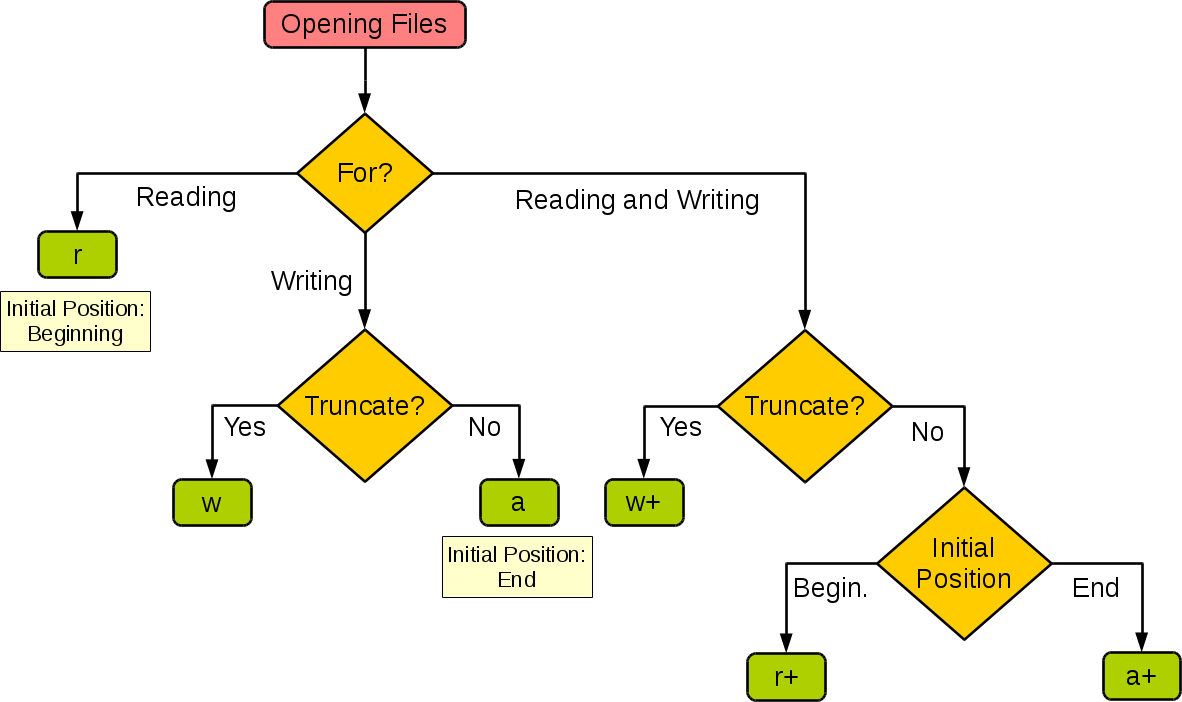
To open a file, use the open() function, which accepts two primary arguments: the file name and the mode in which the file should be opened. Modes include read (“r”), write (“w”), append (“a”), and exclusive creation (“x”).
Language: python
file = open(“example.txt”, “r”)
In this example, “example.txt” is the name of the file to be opened, and “r” indicates that the file is being opened in read mode.
Different Modes in Python
Each mode serves a specific purpose:
-“r”: Read mode is used to read data from an existing file.
-“w”: Write mode is used to create a new file or overwrite an existing one.
-“a”: Append mode is used to add new data to the end of the file without altering existing content.
-“x”: Exclusive creation mode is used to create a new file, failing if the file already exists.
Example: How to Open a File
To further understand “how open a file in python,” let’s consider an example:
Language: python
try:
file = open(“data.txt”, “r”)
content = file.read()
print(content)
finally:
file.close()
This script demonstrates opening a file in read mode and printing its contents. It’s crucial to close the file using file.close() to free up system resources.
How to Create a File in Python
Creating a file in Python can be accomplished using the same open() function, but with a different mode. The process of “how create a file in python” emphasizes leveraging the write or exclusive creation modes to ensure that files are generated correctly.
Using Write Mode
The easiest way to create a file is by opening it in write mode. If the file does not exist, Python will automatically create it.
Language: python
file = open(“newfile.txt”, “w”)
file.write(“This is a new file.”)
file.close()
In this example, “newfile.txt” is created, and a string is written into it. The file is then closed to save changes.
Exclusive Creation Mode
If the goal is to create a file only if it does not exist, use the “x” mode to prevent overwriting:
Language: python
try:
file = open(“uniquefile.txt”, “x”)
file.write(“Unique content”)
finally:
file.close()
Using “x” ensures the file is only created if it doesn’t already exist, preventing accidental data loss.
How to Write to a File in Python
Writing to files is another fundamental aspect of file handling in Python. Understanding “how to write to a file in python” equips you with skills to store data efficiently.
Writing Techniques
Python allows writing data to files using the write() and writelines() methods. The write() method writes a single string, whereas writelines() can output a list of strings simultaneously.
Language: python
file = open(“output.txt”, “w”)
file.write(“First line of text.\n”)
file.writelines([“Second line.\n”, “Third line.\n”])
file.close()
In this script, output.txt is opened in write mode and multiple lines are added using both write() and writelines() methods.
How to Write Python Script for File Handling
Understanding how to write python script for file handling involves creating scripts that perform a sequence of operations. This is where combining different file handling functionalities pays off in building comprehensive programs.
Creating a Simple Python Script
Here’s an example that demonstrates “how to write a python program” that reads from one file and writes to another:
Language: python
try:
source_file = open(“source.txt”, “r”)
content = source_file.read()
finally:
source_file.close()
try:
target_file = open(“target.txt”, “w”)
target_file.write(content)
finally:
target_file.close()
This script reads content from source.txt and writes it to target.txt, showcasing both reading and writing operations in one script.
How to Open NC File in Python
Special file formats, like NetCDF (NC file), often require specific libraries for handling. Python provides several libraries that facilitate working with these formats, such as netCDF4.
Using netCDF4 to Open NC Files
To handle NC files, first ensure the netCDF4 library is installed. Then, use it to open and manipulate NetCDF files:
Language: python
from netCDF4 import Dataset
nc_file = Dataset(“sample.nc”, “r”)
print(nc_file.variables.keys())
nc_file.close()
In this example, Dataset is used to open the file in read mode, and the variables contained in the file are printed.
Handling File Operations with Context Managers
While manually closing files is effective, Python’s with statement offers a cleaner method through context managers, simplifying the process of opening and closing files. With context managers, files are automatically closed when operations are completed.
Using Context Managers
Here’s how a context manager enhances file handling:
Language: python
with open(“example.txt”, “r”) as file:
data = file.read()
print(data)
In this code, example.txt is opened, and the file is automatically closed once the block is exited, reducing chances of errors.
Common File Handling Errors and Solutions
While handling files, it’s possible to encounter errors like file not found, permission denied, or read/write errors. Understanding their causes will enable effective troubleshooting.
Preventing Errors
Most errors arise from attempting to open non-existent files or lacking proper permissions. Use error handling with try-except blocks to mitigate such issues.
Language: python
try:
file = open(“nonexistent.txt”, “r”)
except FileNotFoundError:
print(“File not found error”)
Implementing such mechanisms ensures your scripts handle unexpected conditions gracefully.
Conclusion
The proficiency in file handling techniques using Python is invaluable across many domains. This article has illuminated how to open a file in python, create new files, and write data, building a foundation for more complex data processing tasks. By knowing “how to write python script” that manages files, you can develop robust applications and enhance your coding capabilities. Whether managing simple text files or specialized formats like NC files, Python provides all the tools needed for effective file manipulation.


