
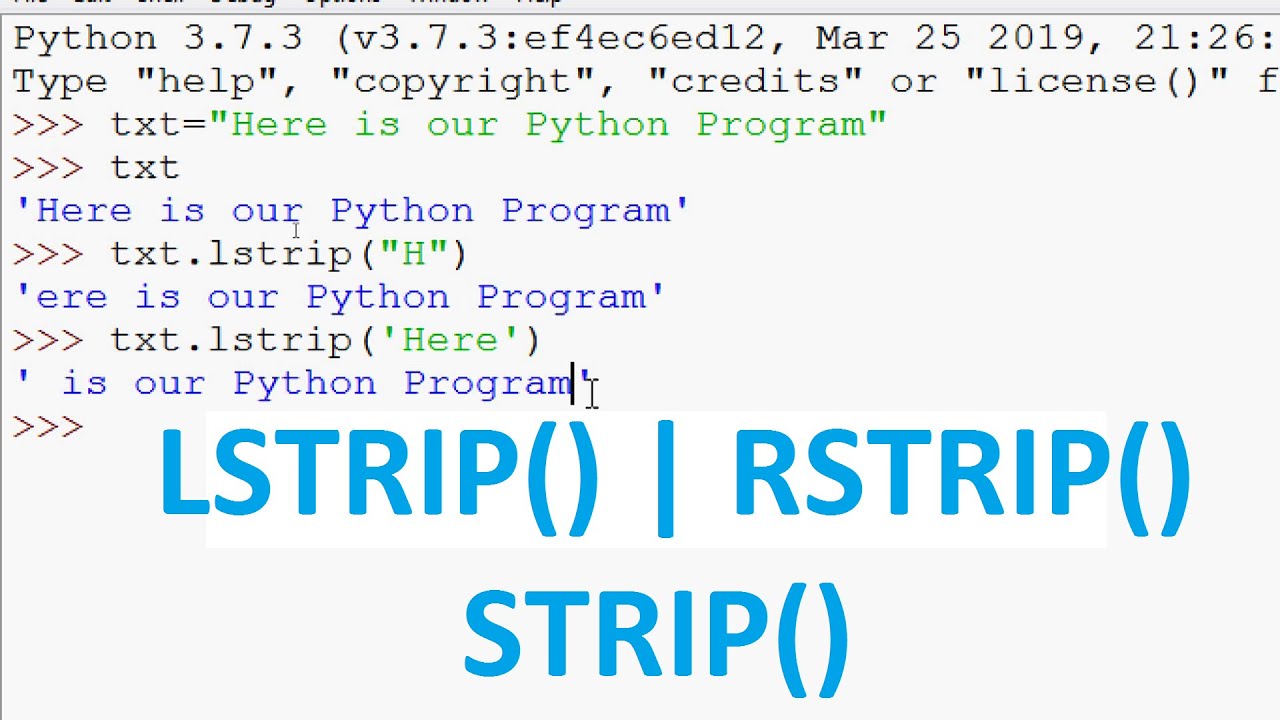
In the realm of programming, string manipulation is a fundamental skill, and Python offers a robust set of methods to manage and manipulate strings efficiently. Among these, the Python strip method, along with its variants lstrip and rstrip, provides essential functionality for trimming and cleaning strings. This comprehensive guide delves into the nuances of these methods, exploring what they do and how they can be utilized to enhance your programming projects.
Introduction to String Manipulation in Python
Python, renowned for its simplicity and readability, offers a plethora of functions and methods to simplify string handling. String manipulation is crucial in many applications, from data preprocessing to text analysis. Understanding how to effectively use Python’s string methods can significantly streamline code, making it more efficient and readable.
What is the Importance of String Manipulation?
String manipulation allows developers to prepare and cleanse data inputs, enhance user interfaces, and transform text data into a usable format. Whether you are parsing web data, preparing CSV files for analysis, or simply formatting strings for display, Python’s built-in methods like strip can prove invaluable.
Understanding the Python Strip Method
What Does the Strip Method Do in Python?
The Python strip method is used to remove any leading and trailing whitespace characters, including spaces, tabs, and newline characters, from a string. By employing the strip method, one can ensure that data strings are trimmed down to only the necessary characters, free from unwanted spaces.
For example, consider the following:
Language: python
text = ” Hello, World! “
clean_text = text.strip()
Here, clean_text would be “Hello, World!”, with the leading and trailing spaces removed.
Why Use the Strip Method in Python?
The python strip method is particularly useful when dealing with data input from users, files, or databases, where extra spaces can disrupt data consistency and processing. Using strip ensures that strings are clean, facilitating more effective comparisons and transformations.
Exploring Variants: Lstrip and Rstrip
Lstrip Method in Python
While strip in python targets both ends of a string, sometimes it is necessary to remove whitespace specifically from the beginning of the string. This is where the lstrip method in python comes into play.
Language: python
text = ” Hello, World!”
clean_text = text.lstrip()
In this example, clean_text becomes “Hello, World!”, eliminating only the spaces at the beginning.
Rstrip Method in Python
Conversely, if whitespace needs removal from the end of a string, the rstrip method is the tool of choice. It focuses solely on trailing whitespace, leaving leading spaces intact.
Language: python
text = “Hello, World! “
clean_text = text.rstrip()
Here, clean_text results in “Hello, World!”, with the trailing spaces having been removed.
Practical Applications of Strip, Lstrip, and Rstrip
The importance of understanding what does the strip method do in python extends to various practical applications. Whether you are cleaning user input, processing text data, or preparing data for machine learning algorithms, these methods are invaluable tools.
Data Cleaning and Preparation
String trimming is often a critical step in data cleaning processes. For instance, when reading data from CSV files or scraping data from the web, extra spaces can lead to inaccuracies if not removed. The python strip method can be seamlessly integrated into data cleaning routines to ensure consistency and accuracy.
User Input Validation
In user-facing applications, validating and cleaning user input is essential. By applying the strip method, developers can remove unintended whitespace before validation checks, preventing user errors and improving data quality.
Text File Processing
When processing text files, especially those generated or edited by users, line breaks and spaces can disrupt string processing. Using strip, lstrip, and rstrip can aid in normalizing these strings for further processing or storage.
Advanced Usage and Customization
Custom Character Stripping
Beyond the default whitespace removal, the strip method allows for custom character stripping. By specifying a string of characters to remove, you can tailor the method to meet specific needs.
Language: python
text = “##Hello, World!##”
clean_text = text.strip(“#”)
This example shows how to use the python strip method to remove specific unwanted characters, resulting in “Hello, World!”.
Integration with Other String Methods
Combining strip, lstrip, and rstrip with other string methods can provide powerful string manipulation capabilities. For instance, chaining these methods with methods like replace or split can perform complex text transformations.
Comparing Strip, Lstrip, and Rstrip: A Summary
To better illustrate the differences and use cases for these methods, refer to the table below:
| Method | Functionality | Use Case |
| strip() | Removes whitespace from both ends | General cleanup of input strings |
| lstrip() | Removes whitespace from the start only | Preprocessing strings with unwanted prefix |
| rstrip() | Removes whitespace from the end only | Trimming end characters without affecting start |
Conclusion: Mastering String Manipulation with Python’s Strip Methods
Understanding and mastering the use of Python’s strip methods is essential for any programmer looking to handle strings efficiently. By knowing what does strip do in python and how to employ lstrip and rstrip, developers can write cleaner, more efficient code that accurately handles string inputs and outputs.
Leveraging these methods enables developers to maintain data integrity, streamline data processing, and create better user experiences. As string manipulation remains a core aspect of programming, mastering these methods is pivotal for success in the field.
With this comprehensive understanding, you can now confidently apply the strip, lstrip, and rstrip methods in your Python projects, improving both the functionality and quality of your code.


